Participant steps in a coupled analysis
During a coupled analysis, a specific sequence of steps must be traversed by the participant.
This process is depicted in Figure 1 for a steady analysis, Figure 2 for a transient analysis with iterations (implicit time integration), and Figure 3 for transient analysis without iterations (explicit time integration). Each step is described in more detail below.
It is important that these steps are traversed in this exact sequence as shown below.
Flowchart diagrams for participant steps in a coupled analysis
Participant steps in a steady coupled analysis
This sequence of steps is required for the participant which is doing a steady analysis. Note that the coupled analysis type may or may not be steady. The important part is that if this participant is steady, it must traverse this sequence of steps.
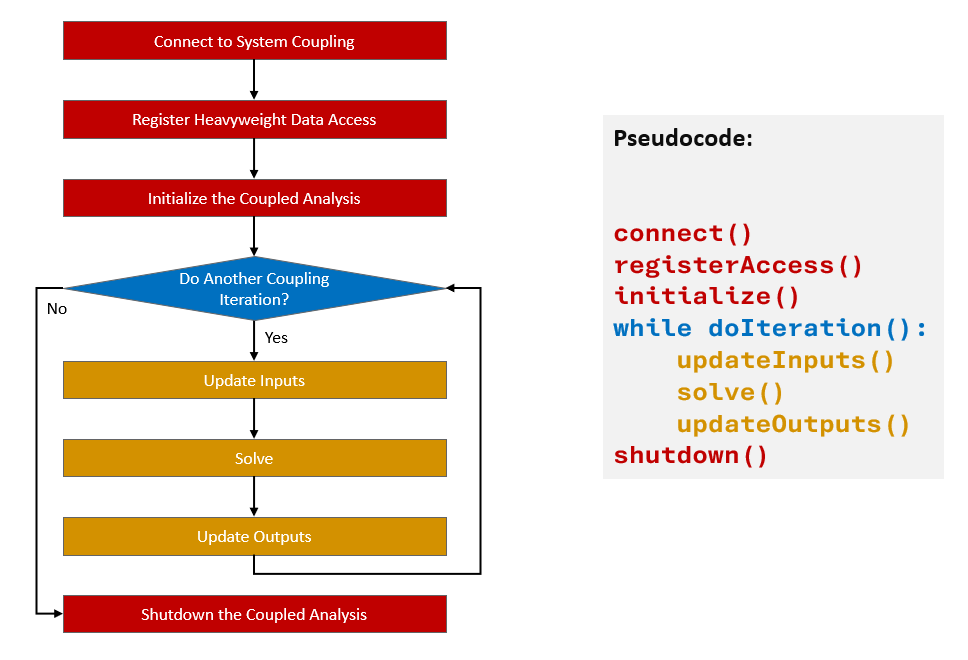
Figure 1: Sequence of participant steps for a steady analysis
Participant steps in a transient coupled analysis with iterations
This sequence of steps is required for the participant which is doing a transient (unsteady) analysis and performs implicit time integration. As shown on the diagram, this participant must be able to redo the same coupling time step multiple times. In other words, this participant must be able to iterate until all convergence criteria are met (when all convergence criteria are met, the participant will not be asked to perform another coupling iteration). The inputs provided to this participant will correspond to the time value at the end of the current coupling time step. Likewise, this participant should produce outputs that correspond to the time value at the end of the current coupling time step.
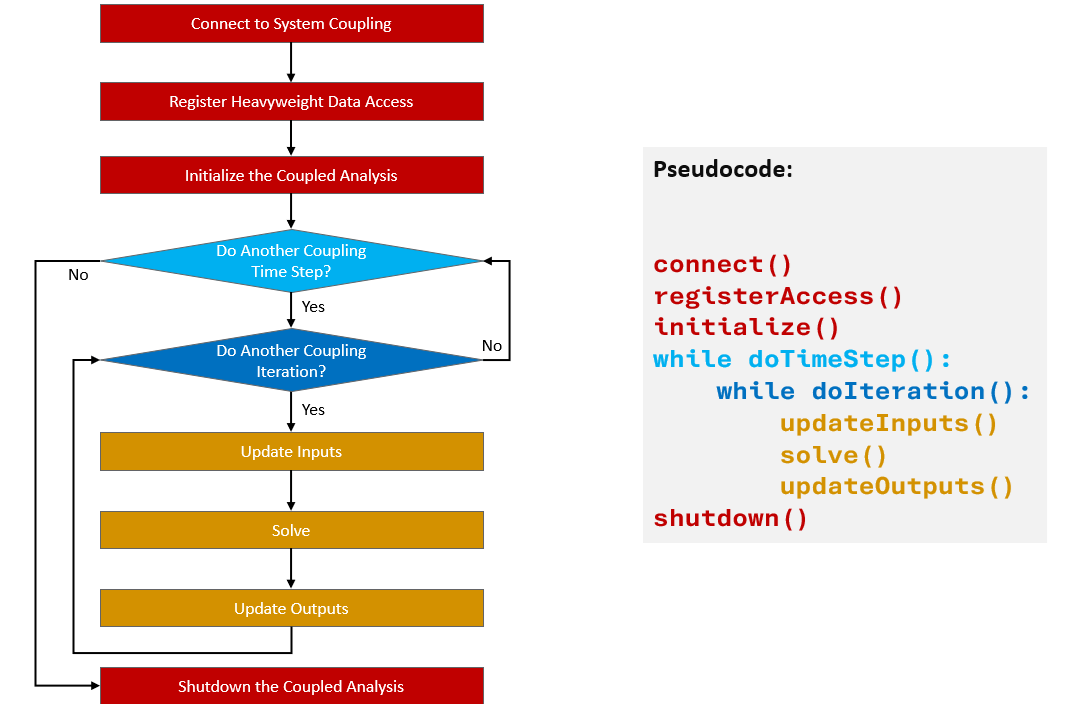
Figure 2: Sequence of participant steps for a transient analysis with iterations
Participant steps in a transient coupled analysis without iterations
This sequence of steps is required for the participant which is doing a transient (unsteady) analysis and performs explicit time integration. The explicit participants do not iterate within the coupling time step. The inputs provided to this participants will correspond to the time value at the beginning of the current coupling time step, and after solving, the participant should produce outputs that correspond to the time value at the end of the current coupling time step.
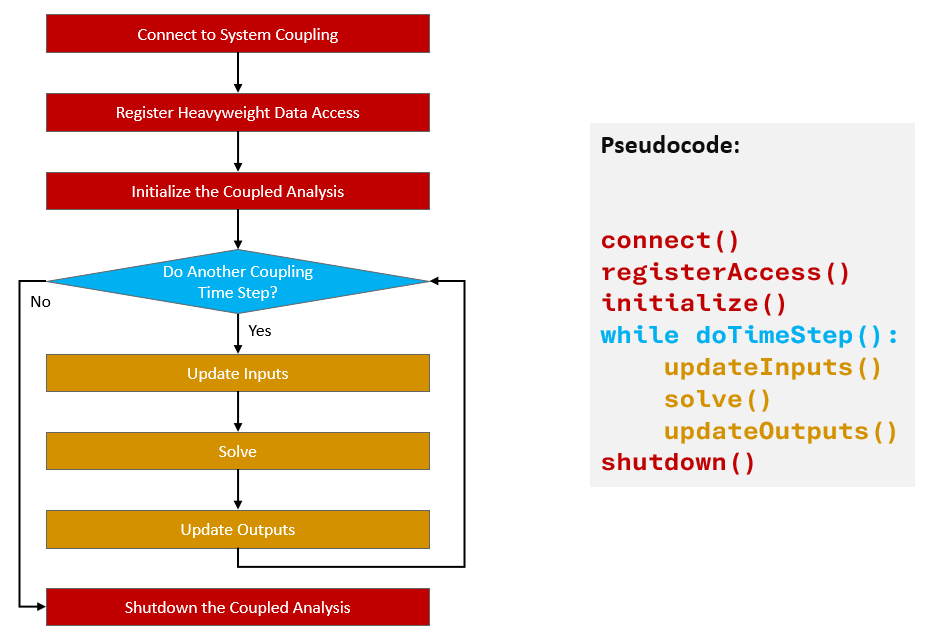
Figure 3: Sequence of participant steps for a transient analysis without iterations
Connect to System Coupling
The connection is established by providing the host name, port number, participant name, and build information.
If running in parallel using a supported MPI distribution, MPI communicator should also be provided. See Execution in a parallel environment for more details.
C++
std::string host, name, buildInfo;
unsigned short port;

...

sysc::SystemCoupling sc(host, port, name, buildInfo);
C
char host[STRING_MAX_SIZE];
unsigned short port;
char name[STRING_MAX_SIZE];
char buildInfo[STRING_MAX_SIZE];

...

SyscError ret = syscConnect(host, port, name, buildInfo);
Fortran
character(len=256) :: host
integer :: scPort = 0
character(len=256) :: name
character(len=256) :: buildInfo

...

ret = syscConnectF(scHost, scPort, scName, buildInfo)
Python
import pyExt.SystemCouplingParticipant as sysc

host = str()
port = int()
name = str()
buildInfo = str()

...

sc = sysc.SystemCoupling(host, port, name, buildInfo)
Register heavyweight data access
Register access to the participant's mesh and variable values.
Register any other callback functions (for example a callback for creating a restart point).
In the examples below, getSurfaceMesh, getInputScalarData, and
createRestartPoint are functions that conform to provided prototypes that
are to be implemented in the participant solver. See
Access to heavyweight data and
Creating restart points and restarting a coupled analysis
for more details.
C++
sc.registerSurfaceMeshAccess(&getSurfaceMesh);
sc.registerInputScalarDataAccess(&getInputScalarData);
sc.registerRestartPointCreation(&createRestartPoint);
C
SyscError ret;
ret = syscRegisterSurfMeshAccess(&getSurfaceMesh);
ret = syscRegisterInputScalarDataAccess(&getInputScalarData);
ret = syscRegisterRestartPointCreation(&createRestartPoint);
Fortran
type(SyscErrorF) :: ret
ret = syscRegisterSurfMeshAccessF(getSurfaceMesh)
ret = syscRegisterInputScalarDataAccessF(getInputScalarData)
ret = syscRegisterRestartPointCreationF(createRestartPoint)
Python
sc.registerSurfaceMeshAccess(getSurfaceMesh)
sc.registerInputScalarDataAccess(getInputScalarData)
sc.registerRestartPointCreation(createRestartPoint)
Initialize the coupled analysis
Notify System Coupling that the analysis can be initialized. Note that if parameters are used, initial values for output parameters should be set prior to initializing the analysis. If no initial value is set, the parameter will be initialized to zero. See Parameter Data Access for more details.
C++
// set initial values for any output parameter
sc.setParameterValue(inputParameterName, 12.3);
sc.initializeAnalysis();
C
// set initial values for any output parameter
SyscError ret = syscSetParameterValue(inputParameterName, 12.3);
ret = syscInitializeAnalysis();
Fortran
type(SyscErrorF) :: ret
ret = syscInitializeAnalysisF()
Python
# set initial values for any output parameter
sc.setParameterValue(inputParameterName, 12.3)
sc.initializeAnalysis()
Coupled analysis loop
Enter a coupled analysis loop until the analysis is complete. This step is different, depending on whether the analysis is steady or transient.
-
For steady analysis, there is the coupling iteration loop. The participant should enter the coupling iteration loop and exit it only when there are no more coupling iterations to be done.
-
For transient analysis, there are either one or two nested loops, depending on whether the participant uses implicit or explicit time integration.
-
The outer loop is the coupling time step loop. The participant should enter the coupling time step loop and exit it only when there are no more coupling time steps to be done.
-
The inner loop is the coupling iteration loop. The participant should enter the coupling iteration loop and exit it only when there are no more coupling iterations to be done within the current coupling time step. This loop is required for implicit time integration but is unnecessary if the time integration is explicit.
-
Inside the coupling iteration loop, the participant should iteratively update inputs, perform its solver iterations, and then update outputs. These operations need only be performed once per time step if the participant is explicit.
-
Update Inputs. Notify System Coupling that inputs can be updated. After inputs update, the inputs are up-to-date for the current iteration. The participant solver can perform its solver iterations after inputs update.
-
Update Outputs. Notify System Coupling that outputs are updated and provide solver convergence status. Before outputs update, the participant must update all output data so that it can be consumed by System Coupling.
Steady analysis loop
C++
while (sc.doIteration()) {
  sc.updateInputs();
  // ... solve here ...
  sc.updateOutputs(sysc::Converged);
}
C
SyscError ret;
...
while (syscDoIteration() == 1) {
  ret = syscUpdateInputs();
  /* ... solve here ... */
  ret = sysc.updateOutputs(SyscConverged);
}
Fortran
type(SyscErrorF) :: ret
do while (syscDoIterationF())
  ret = syscUpdateInputsF()
  ! ... solve here ...
  ret = syscUpdateOutputsF(SyscConverged)
end do
Python
while sc.doIteration():
  sc.updateInputs()
  # ... solve here ...
  sc.updateOutputs(sysc.Converged)
Transient analysis loop with inner iterations (implicit time integration)
C++
while (sc.doTimeStep()) {
  while (sc.doIteration()) {
    sc.updateInputs();
    // ... solve here ...
    sc.updateOutputs(sysc::Converged);
  }
}
C
SyscError ret;
...

while (syscDoTimeStep() == 1) {
  while (syscDoIteration() == 1) {
    ret = syscUpdateInputs();
    /* ... solve here ... */
    ret = sysc.updateOutputs(SyscConverged);
  }
}
Fortran
type(SyscErrorF) :: ret
do while (syscDoTimeStepF())
  do while (syscDoIterationF())
    ret = syscUpdateInputsF()
    ! ... solve here ...
    ret = syscUpdateOutputsF(SyscConverged)
  end do
end do
Python
while sc.doTimeStep():
  while sc.doIteration():
    sc.updateInputs()
    # ... solve here ...
    sc.updateOutputs(sysc.Converged)
Transient analysis loop without iterations (explicit time integration)
C++
while (sc.doTimeStep()) {
  sc.updateInputs();
  // ... solve here ...
  sc.updateOutputs(sysc::Converged);
}
Shutdown the coupled analysis
This step is reached after exiting from coupled analysis loop. System Coupling will be disconnected. The solver should proceed to an orderly shutdown after this step.
C++
sc.disconnect();
C
SyscError ret = syscDisconnect();
Fortran
type(SyscErrorF) :: ret
ret = syscDisconnectF()
Python
sc.disconnect()